

Global Office: Sync - Contractors Edition
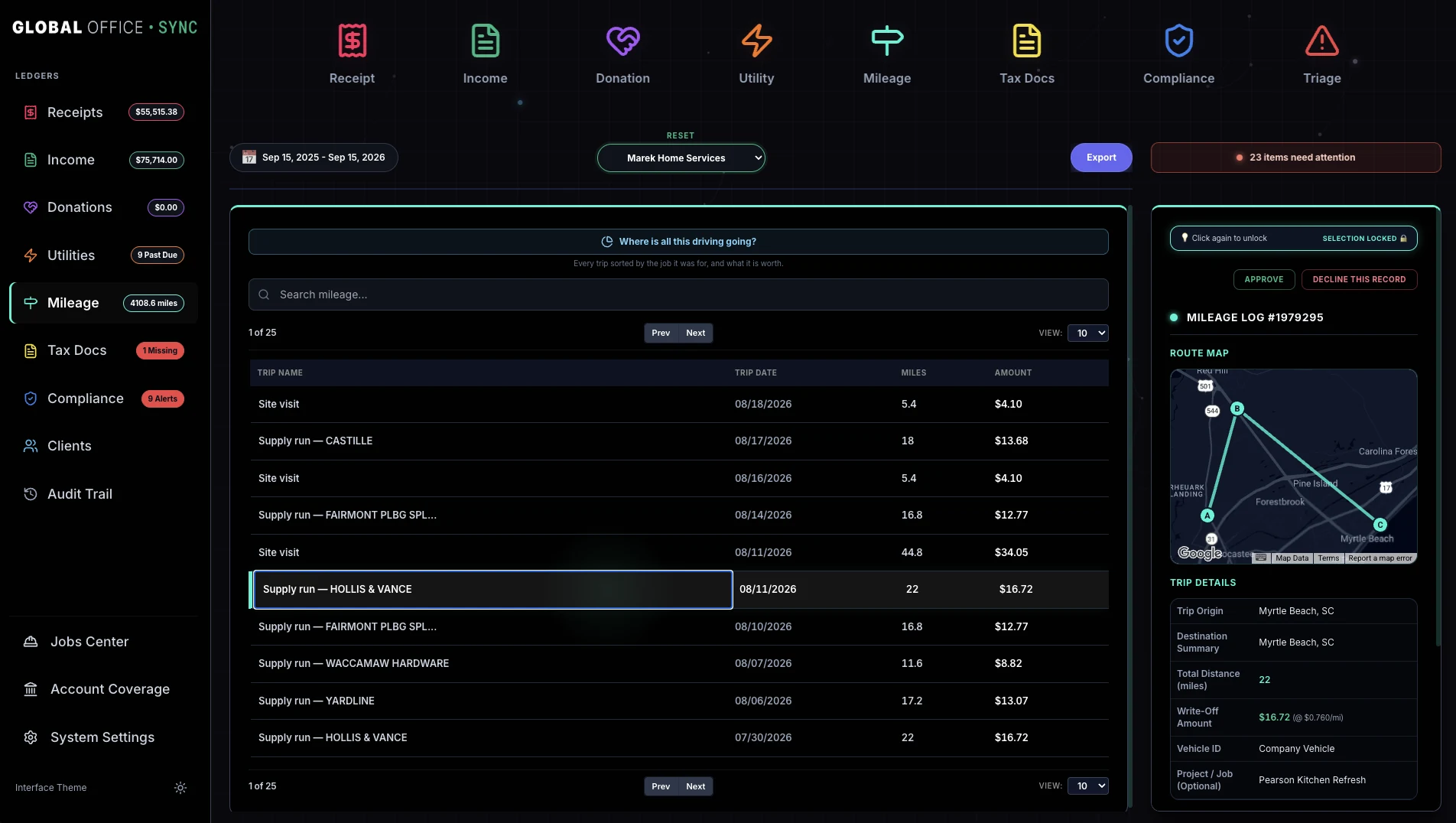
You drove to Springfield on a Tuesday. There's a hardware receipt from Springfield that same Tuesday. Same job? Now you know what that job really cost.
A subcontractor's coverage lapsed in July and they're on your job site right now. If your insurer audits you, they can call that person your employee and charge you premium on every dollar you paid them after it lapsed.
That invoice has been sitting unpaid for 71 days. That's your money, in someone else's account.
And a couple of quiet ones that people tend to sit with for a moment: one dollar in every five you spent went to subcontractors, and doors and windows alone came to more than seven thousand. That's not something you'd ever see in a shoebox full of receipts.

None of that is data you entered - it's all in the paper. Global Office: Sync found all of it, and told you while you could still do something about it.
This is what happens when the paper finally has something to talk to.
And nothing gets filed without you saying so.
Ever.
Photograph a document, drop in a PDF, or hand over a folder of many at once. Nothing has to be sorted first. A blurry or dark photo is caught on the phone before it's sent, with the choice to retake it or use it anyway. Things with no document get typed straight in, and a loan or credit card payment can be split between interest and principal, so the two are never treated as the same thing.
Not just the total. Line items, tax, shipping, dates, the payer block on a 1099, the coverages on an insurance certificate. Then it proposes a category, matched against a real chart of accounts rather than a generic list.
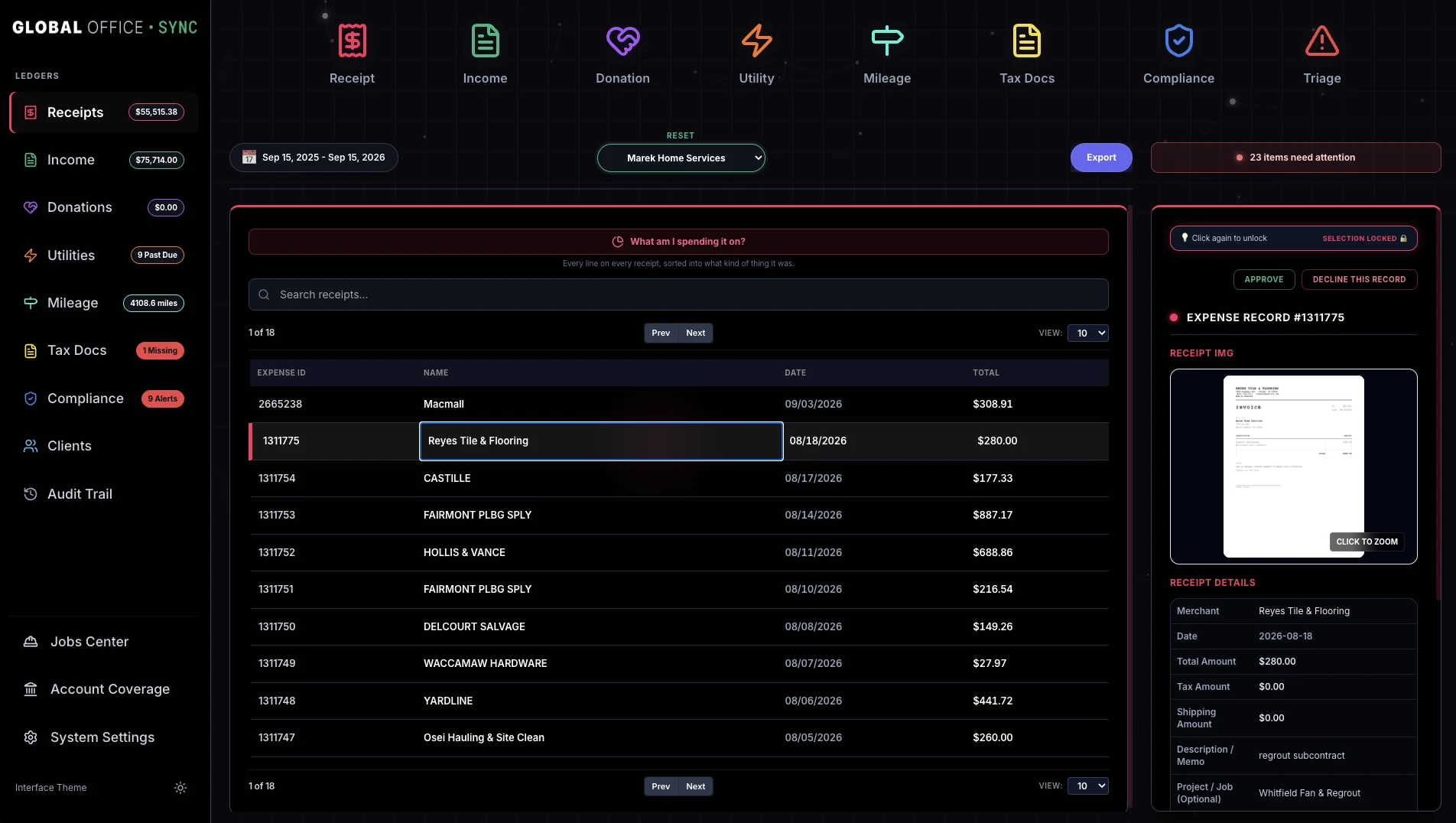
One screen, with the photograph beside the numbers1. Anything that needs a second look says why in words rather than in a color. Lines it's not confident about are marked and left blank, because a product that guesses rather than leave a box empty has just made you check every box.
In a ledger built for that document type, and out to QuickBooks Online, Xero or FreshBooks with the photograph attached. Sync won't send the same record twice, and it remembers your correction for next time.


The ledgers
Receipts, income, utility bills, trips, tax forms and certificates each get their own ledger, with the columns that kind of document actually has. Pick the dates once at the top and every ledger follows.
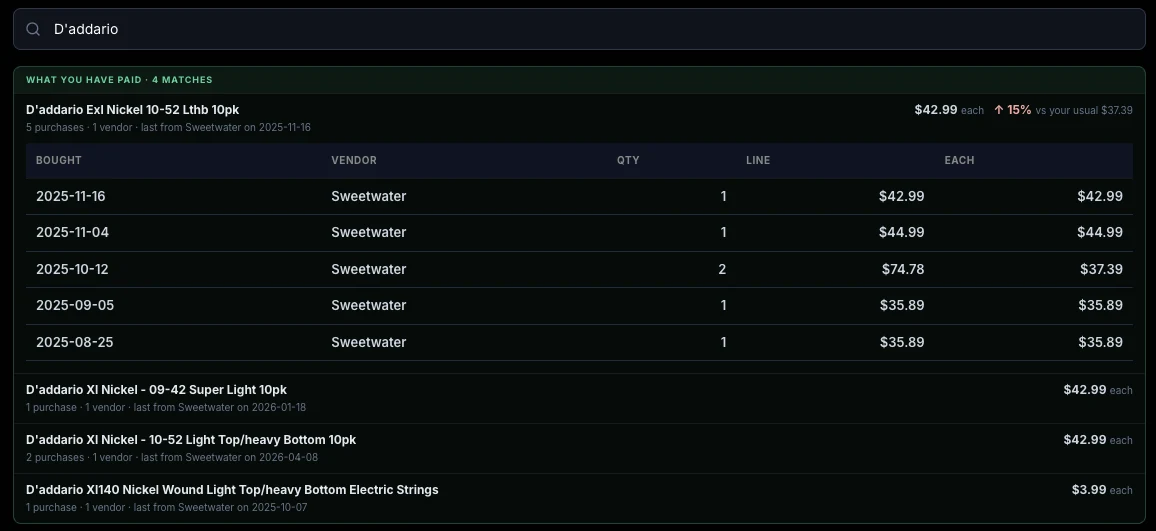
Price history, in the Receipts search
Type something you buy into the Receipts search and what you've paid for it comes up with the results: every purchase, the store, the quantity, and the latest price against your usual one. It knows because it read your receipts, all of them, down to the line.
What you last paid for a thing, and where, isn't a record of money you already spent. It is the number you need when you're pricing the next job.
If you do the books for other people
A bookkeeper's rate is built on knowing where things go, catching what's wrong, and standing behind the result. None of that's the part that takes the time.
Global Office: Sync handles the part that takes the time. It reads receipts, invoices, utility statements, certificates of insurance, 1099s and W-9s. It pulls every field off the page, matches each line item against that client's own chart of accounts, and proposes the entry.
Everything you actually bill for, you still do. Everything else stops being your job.
So the fee you charge now takes less of your day to earn. Take more clients at that rate, or keep the roster and get the hours back. That's the whole pitch, and it's simple arithmetic.

No more 'Uncategorized Expense'. That's where QuickBooks puts whatever it can't place, and somebody has to dig it all back out at tax time. Global Office: Sync matches line items against that client's actual chart of accounts, with their account numbers intact. Account 090 stays 090. What it can't place is marked and named, and comes back to you as a question rather than being swept into a catch-all.
Chasing clients for paperwork. A client on Global Office: Sync - Contractors Edition sends their documents to your roster on their own. No emailed archives, no "did you get my receipts," no asking twice. Everyone else gets a link they open on their phone. Time spent chasing paper is largely unbilled time.
The client you haven't opened since April. Global Office: Sync watches every client on the roster, not only the one in front of you. Finding out in August that a certificate lapsed in July is finding out too late.
Setting up a new client. Pull their chart straight out of their QuickBooks or Xero, upload it, or start from one of six that ship with Sync, so you're not stuck retyping someone's chart of accounts at 9PM.
January. You know before December which subcontractors are missing a W-9, which client crossed the threshold and on what date, and which certificates lapsed during the year. 1099 season stops being a scramble, because the work got done last year, when the paperwork came in.
And Sync gets faster as it goes. Categorize something once and it stays categorized that way for that client. Month six takes less time than month one, and across a roster that compounds.
The practice dashboard · Global Office: Sync
With no client picked, Global Office: Sync opens on everybody you look after. The question you open it with is what needs you today, and whose is it. That's the first thing on the screen.

What needs attention, across every client. One line per finding, with the client's name on it and the button that deals with it. Click a line and its full card opens in the Information Center, which stays open beside the dashboard.
A card for each ledger. The total, the count, and one line in words saying whether the work is up or down on the period before. It counts records rather than dollars, because your week is shaped by three hundred receipts, not by what they add up to.
Where your clients stand. How many need attention, how many have something worth knowing, and how many are all clear. Click any of them to list those clients.
Every client in one table. What needs attention, receipts, income, past due bills, miles, and the day something was last added, which is the column that tells you who you haven't heard from. Click a client to open their books.
If the business is yours
Every competing product is fed by a bank feed, and a bank line reads HOME DEPOT $450. It has no line items and it doesn't say what was bought.
Global Office: Sync reads the lines.
Jobs Center
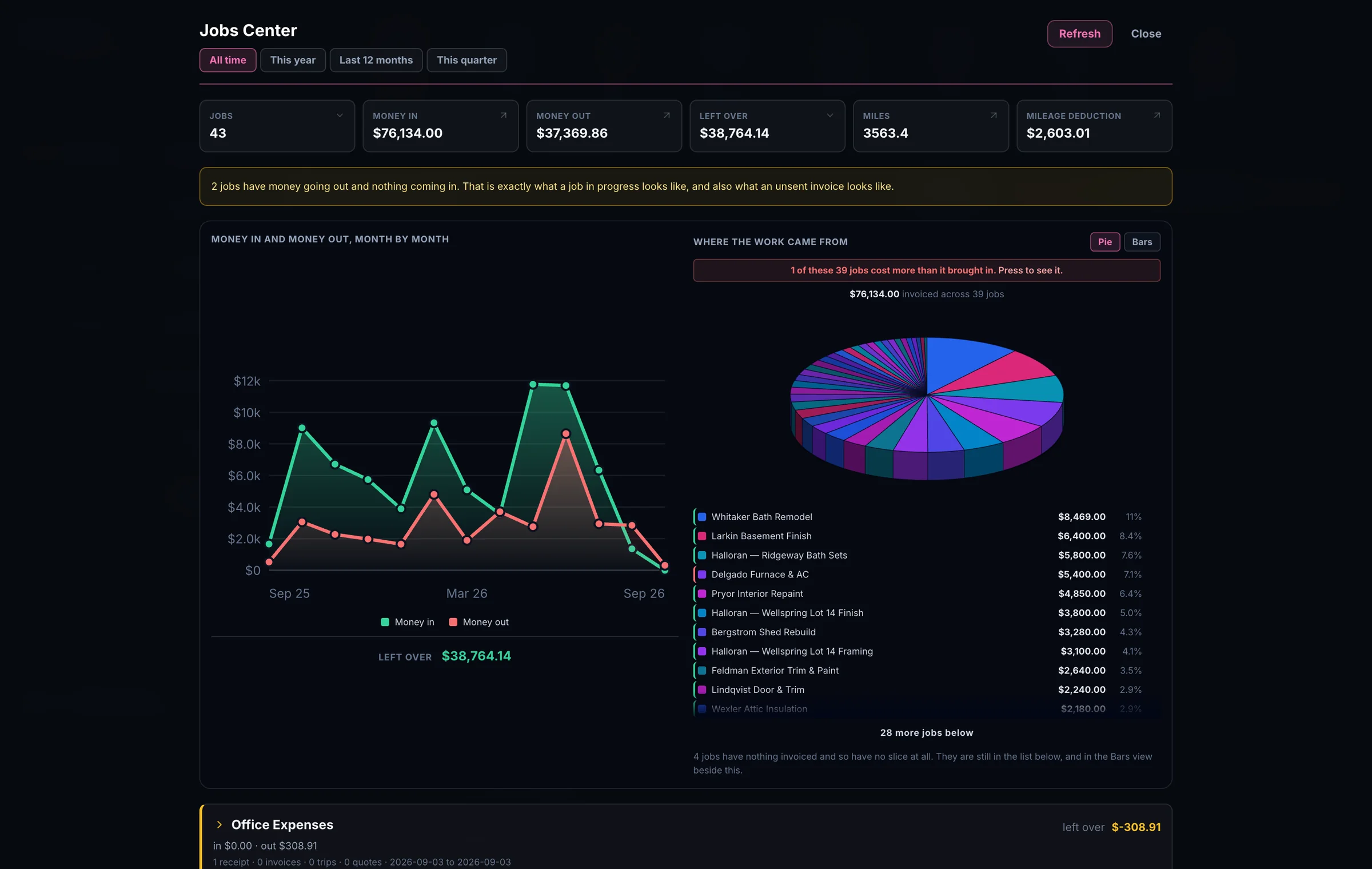
You may not even know this number, because working it out means adding up a year of jobs by hand. One glance at the wheel and you can see it. Eleven percent is one answer. Sixty is a very different one.
A project / job is whatever you type, and the list suggests itself from the jobs already in use. Anything that makes you build a list first would be asking you to do paperwork in order to file paperwork.
Jobs Center
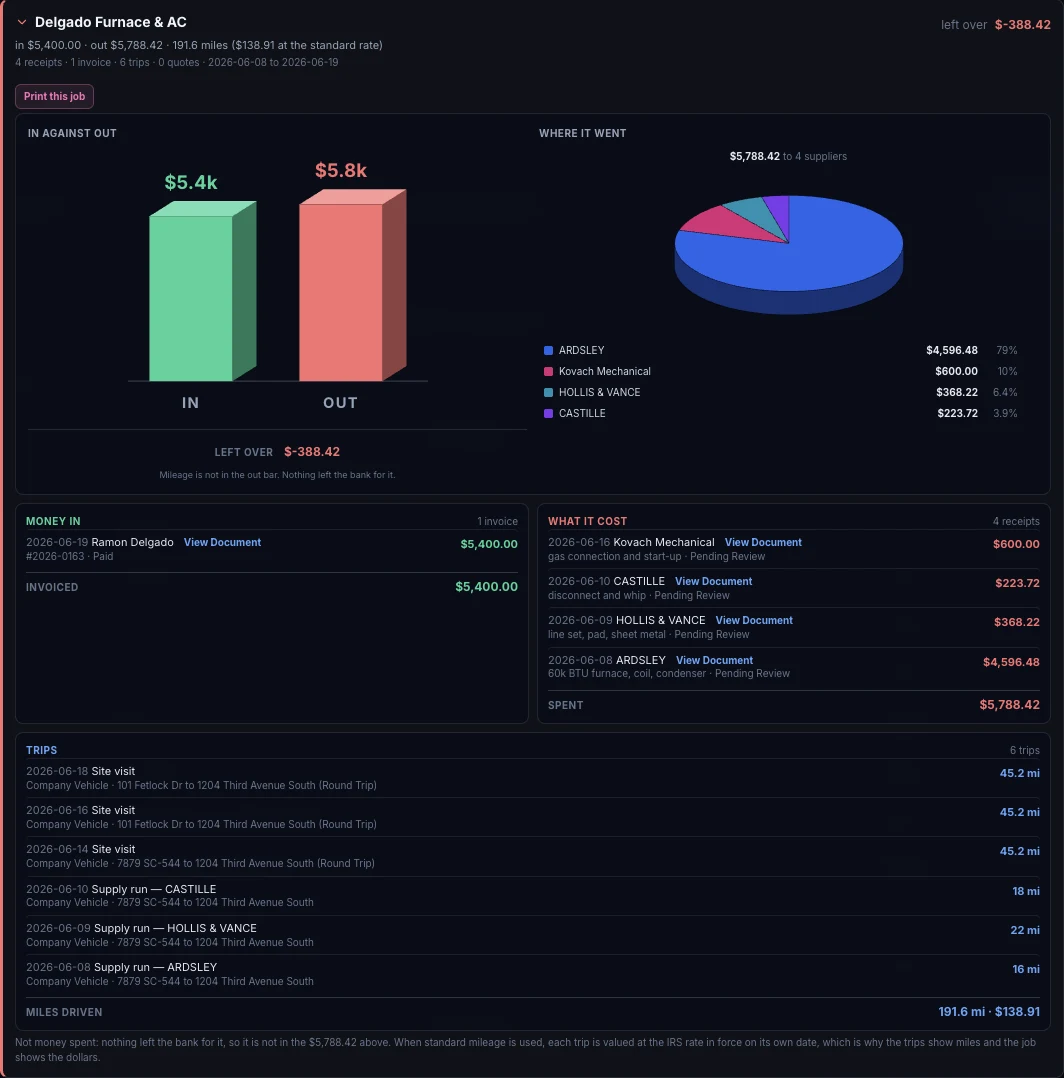
Open a job and it shows you. The Delgado job invoiced $5,400 and spent $5,788.42 on four suppliers, so it lost $388.42. Normally you'd wait to work that out until the end of the year, and by then it would be too late to adjust your pricing.
The invoice, every receipt that went into it, and all six trips are on the same screen, each one still just one click from the photograph it came off.
43 jobs - one of them cost more than it brought in. Global Office: Sync found it from paper you'd already scanned.
Earning Center
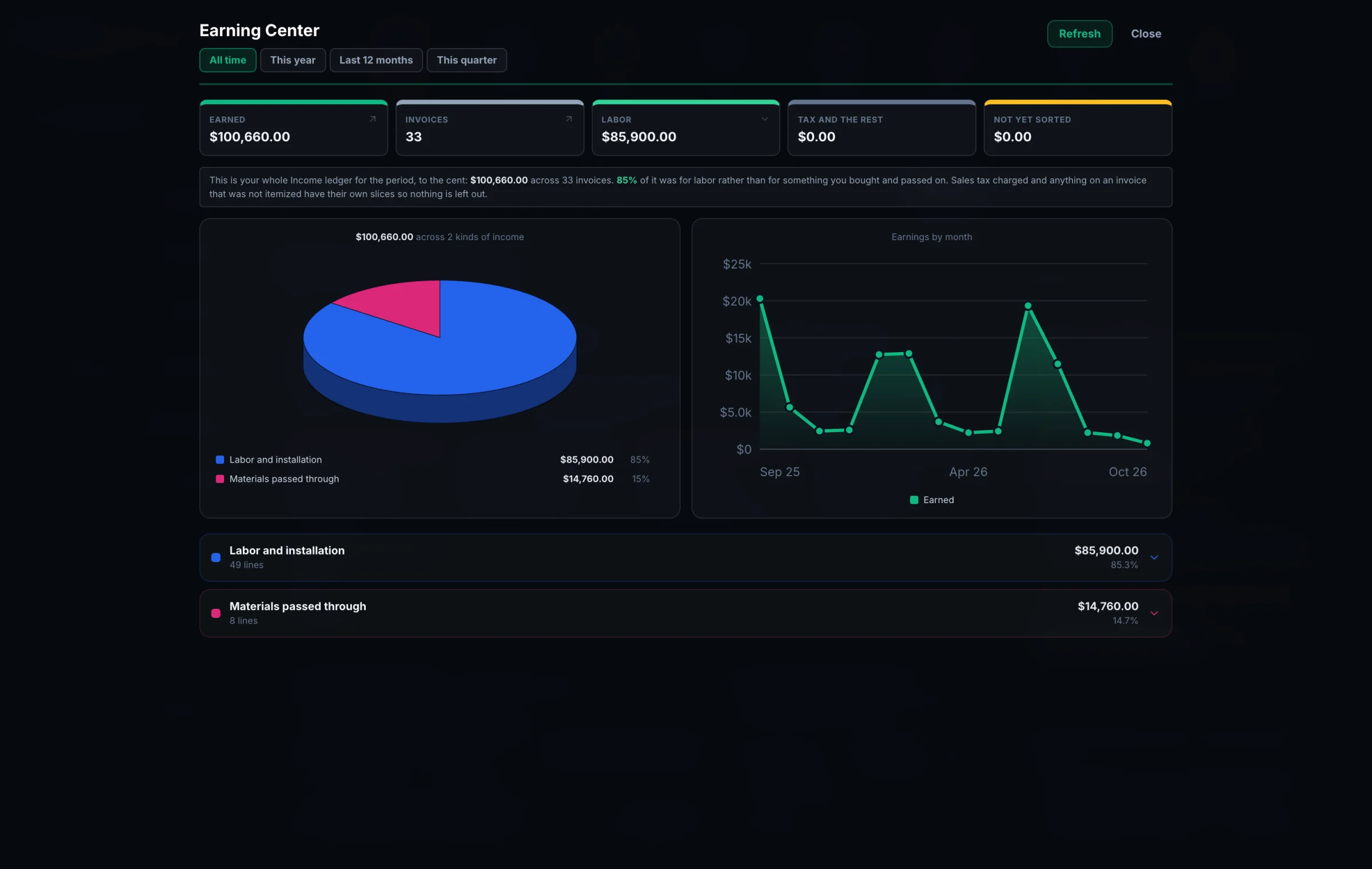
An invoice total doesn't say how much of it was labor and how much was materials you bought and passed straight through at cost. Global Office: Sync reads every line, so it can.
$85,900 of labor. $14,760 of materials. That's the number that decides whether you're profitable or just busy.
Spending Center
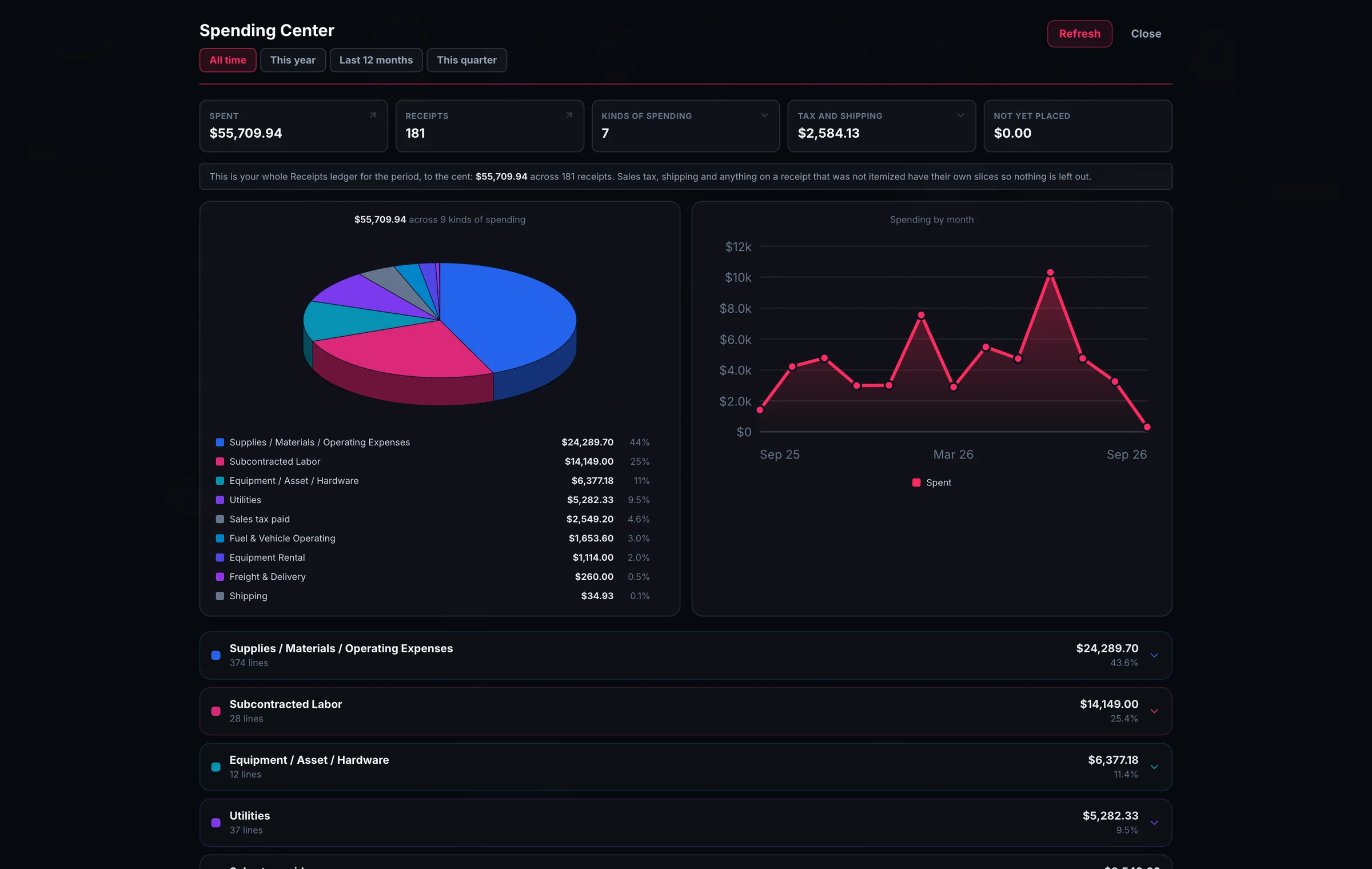
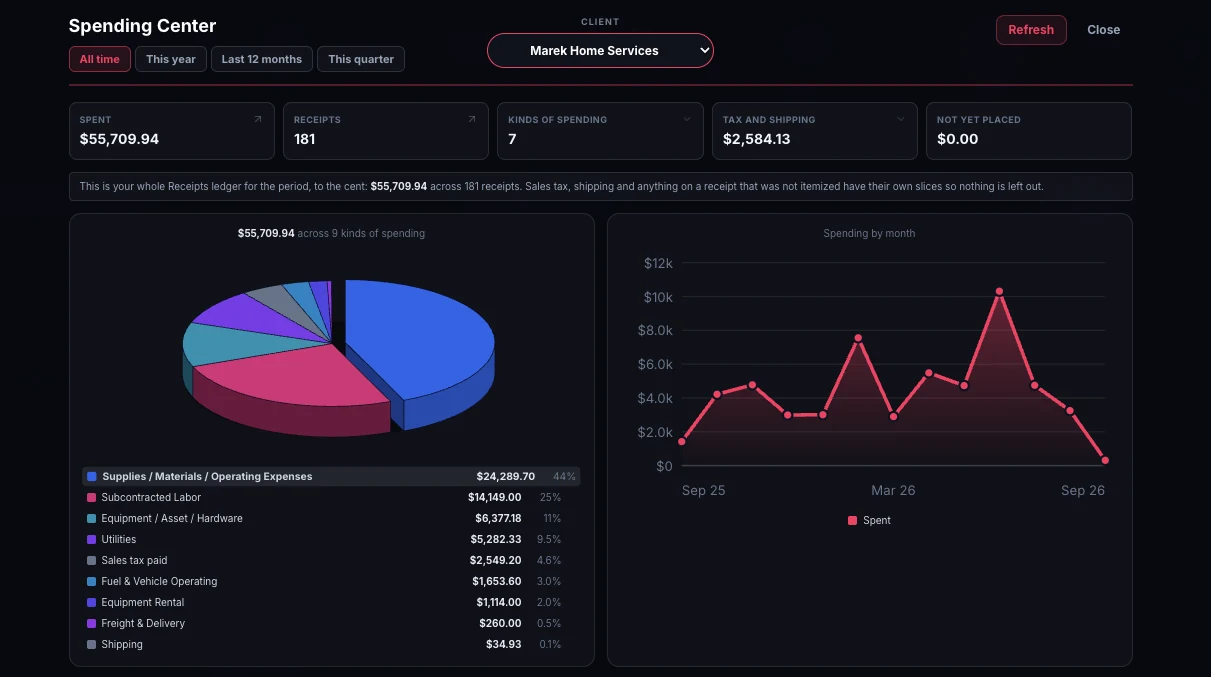
Not just where you spent it, but WHAT you spent it on - lumber, roofing, fasteners, subcontracted labor.
Global Office: Sync already read the lines on your receipts, so there's nothing to set up first.
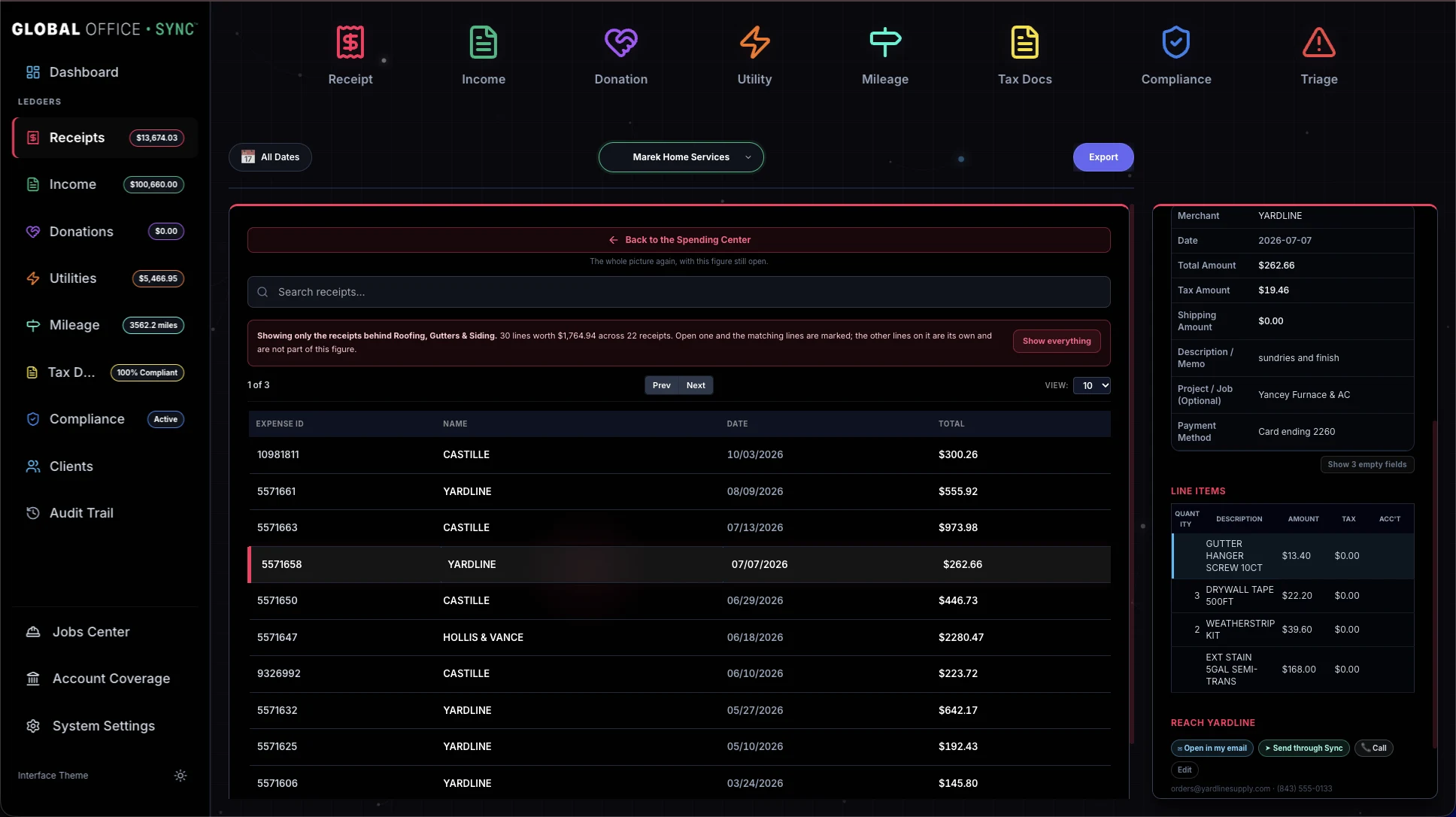
Tap a slice and the Receipts ledger opens on exactly the receipts behind it, with the matching lines lit up. One receipt can hold nine lines and only one of them roofing, so it shows you which one.
Mileage Center
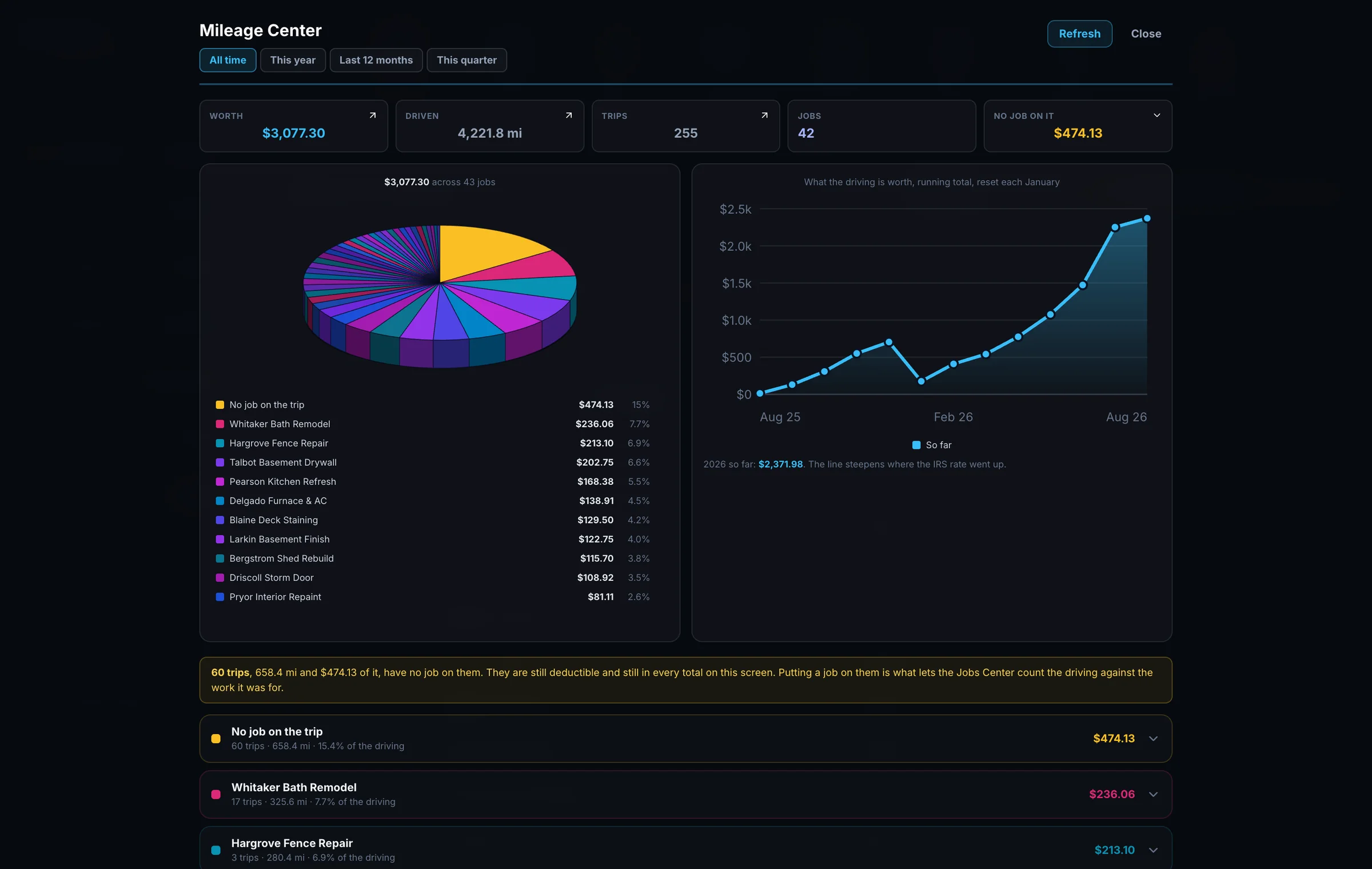
At the standard mileage rate, the driving here is worth $3,077.30 across 4,221.8 miles, 255 trips and 42 jobs. When standard mileage is used, every trip is valued at the IRS rate in force on the date it was driven. Not this year's rate. That day's rate.
The running total has a visible kink in it where the IRS moved the rate partway through 2026, which means everybody still using "the 2026 rate" has been wrong for half the year and might not know it.
Bills Center
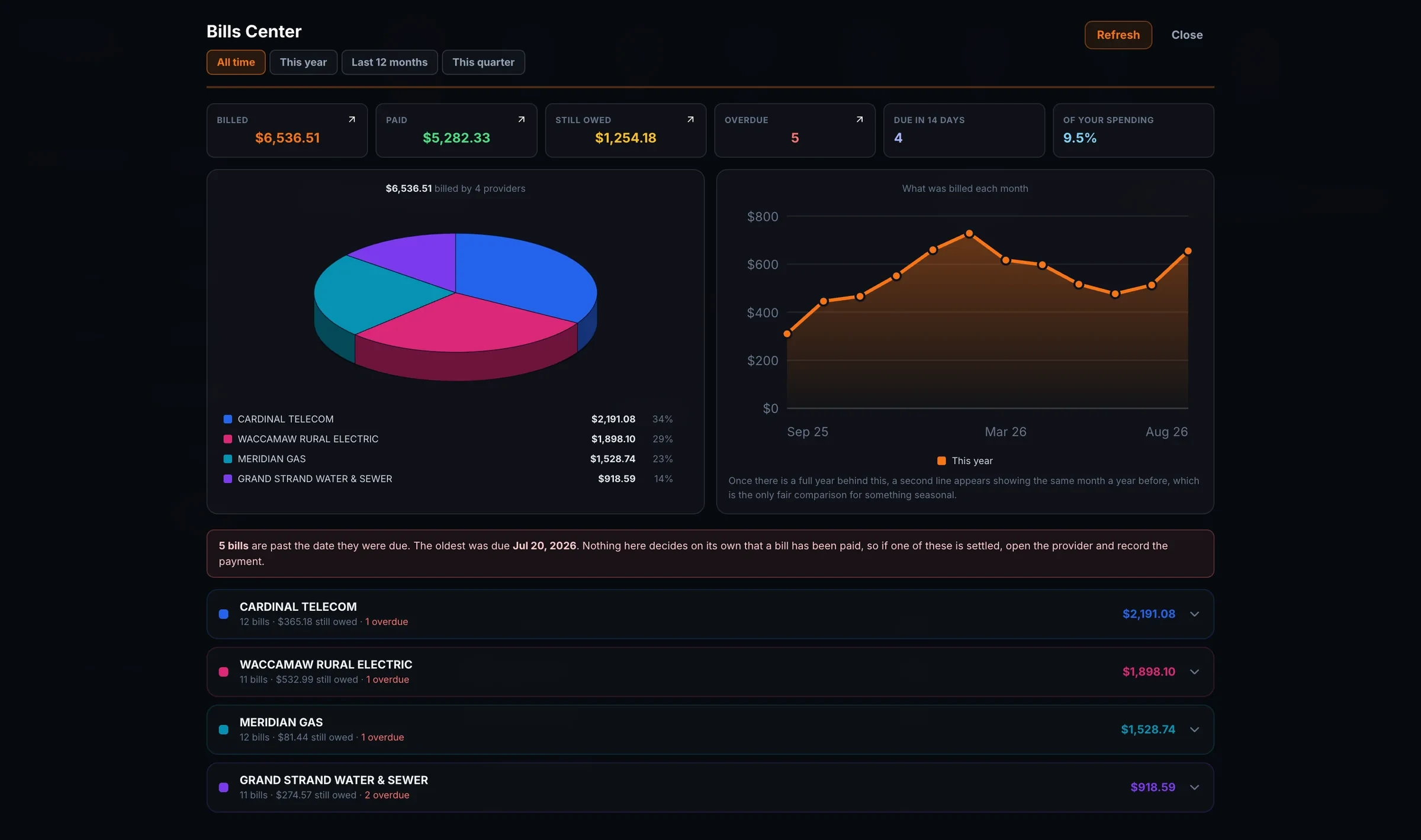
Not just the count, the dates. Five bills are past due, and the oldest has been sitting since July 20th. You see them provider by provider, with everything due in the next two weeks right beside them.
Settle one and record the payment on the same screen. A payment is recorded as its own expense, so a bill can be part paid, paid two different ways, or taken back. Sync never decides a bill has been paid. Only a person does.
Contact Center
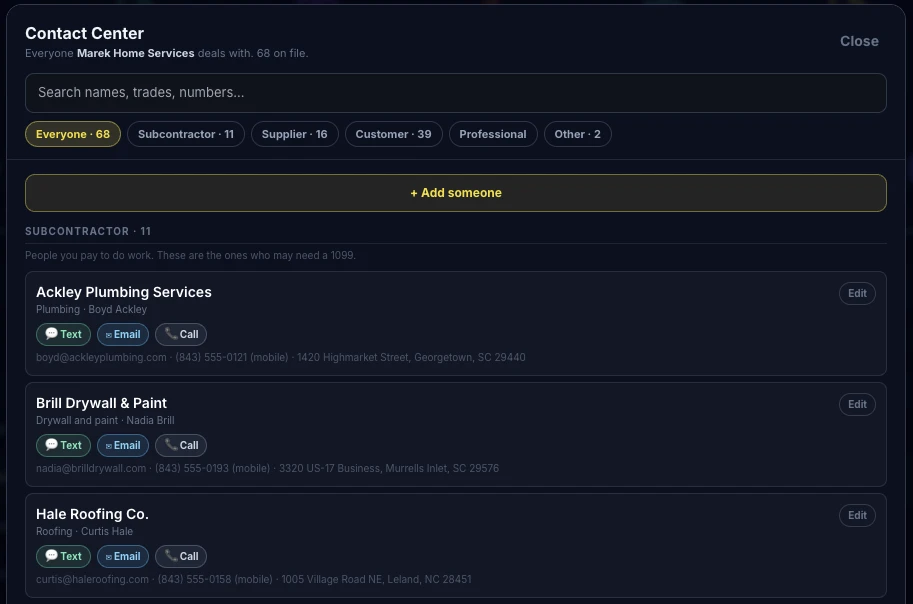
You never built this list. It assembled itself out of the documents you scanned, with the phone numbers and emails from the documents themselves, reachable from the record you happen to be looking at.
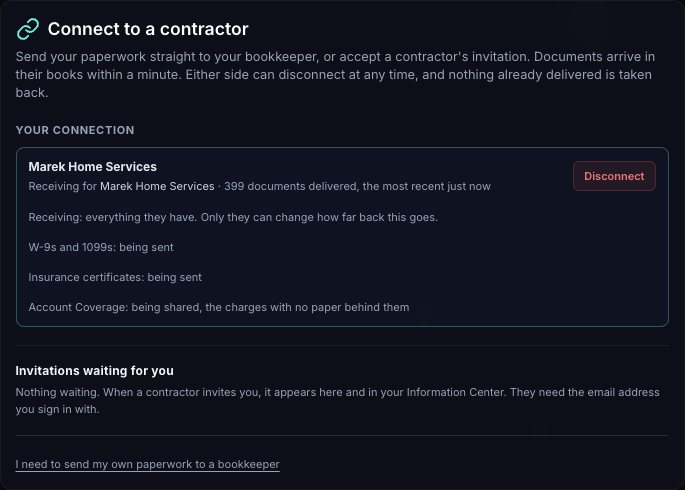
Approved records cross over as copies with the document attached. The contractor decides how far back the bookkeeper can see and whether their Account Coverage goes too, and can change either later. The business details travel with the invitation, and either side can cut the link at any time.
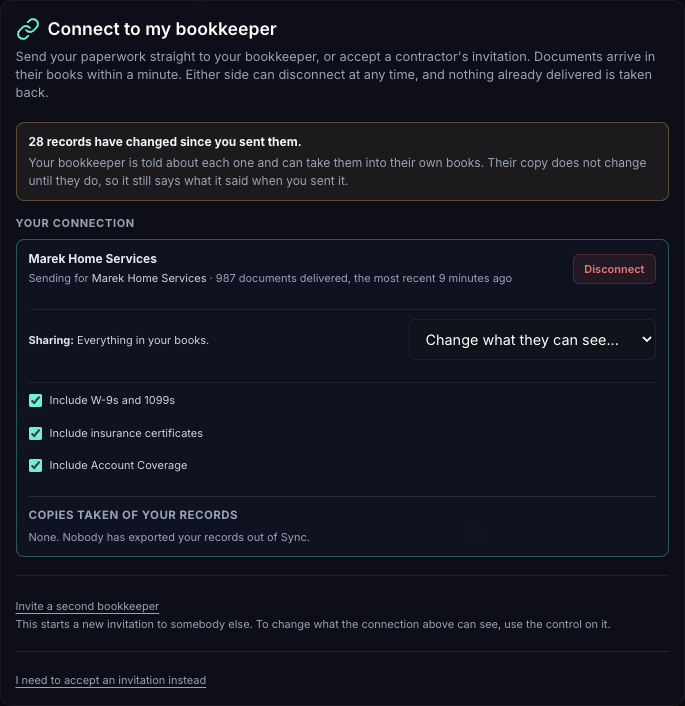
The bookkeeper can mark a bill paid, or change how much of a cost is business, and the contractor is told within the minute. Nothing else crosses back.
Asking a client for documents · Global Office: Sync
Chasing them for paperwork probably isn't what you actually bill for. Make a link for one client and type what you need. They open it on their phone and add photos or PDFs. No account, no password, nothing to install.
Global Office: Sync can send it for you as a finished email with a Send your documents button on it, in your name, and replies come straight back to you. Or copy the message into a text and send it yourself.
The message is exactly what you typed, with the link under it. Every link expires, and you can withdraw one at any time.

The client's page says who's asking and what for, and nothing else. It never shows a figure, a document, or anything sent before.
They say what each document is and tap send. A blurry or dark photo is caught right there on the phone, with Retake photo or Use it anyway, before anything goes.

When something comes back, you're told. A card in the Information Center says which client sent it and how many are waiting, and it stays until you've dealt with every document. There's no Dismiss on it.

Every document is scanned the moment it arrives. None of it goes into the books until you've looked at it.
Review opens the ordinary review screen, already filled in and already on the right client. Accept it, correct it, or decline it with a reason the client never sees. Once everything sent has been dealt with, the request closes itself.

Built for the phone first
Not a companion app with three buttons on it. The same ledgers, the same findings, the same jobs, on the screen you actually have with you. The receipt is in the van, and so are you.


Getting the paper you're missing

When the app notices a subcontractor has no W-9, or that a certificate of insurance has run out, the card that tells you carries a button that asks them for it. Their name, their email and their phone are already filled in, out of your own paperwork.
And the message is already written, in words that fit the reason: a certificate that expired, one that's about to, one that never covered the work, one reissued with less cover than the last, a 1099 you're getting in order, a quote nobody came back on. It hands the finished thing to your own email or messaging app, or sends it for you under your name, so it goes from you rather than from a robot. Change a word of it or send it as it stands.
You don't have to type anything. That matters because chasing paper is the job almost nobody does until it's too late, and the reason is never that it was hard. It's that it was unpleasant to start.
The Information Center
Things go in, and later you can find them again. How many of them will tell you about the utility bill that never arrived? A bill that didn't come has no transaction to notice. And that's the one that costs you.
Compliance and certificates
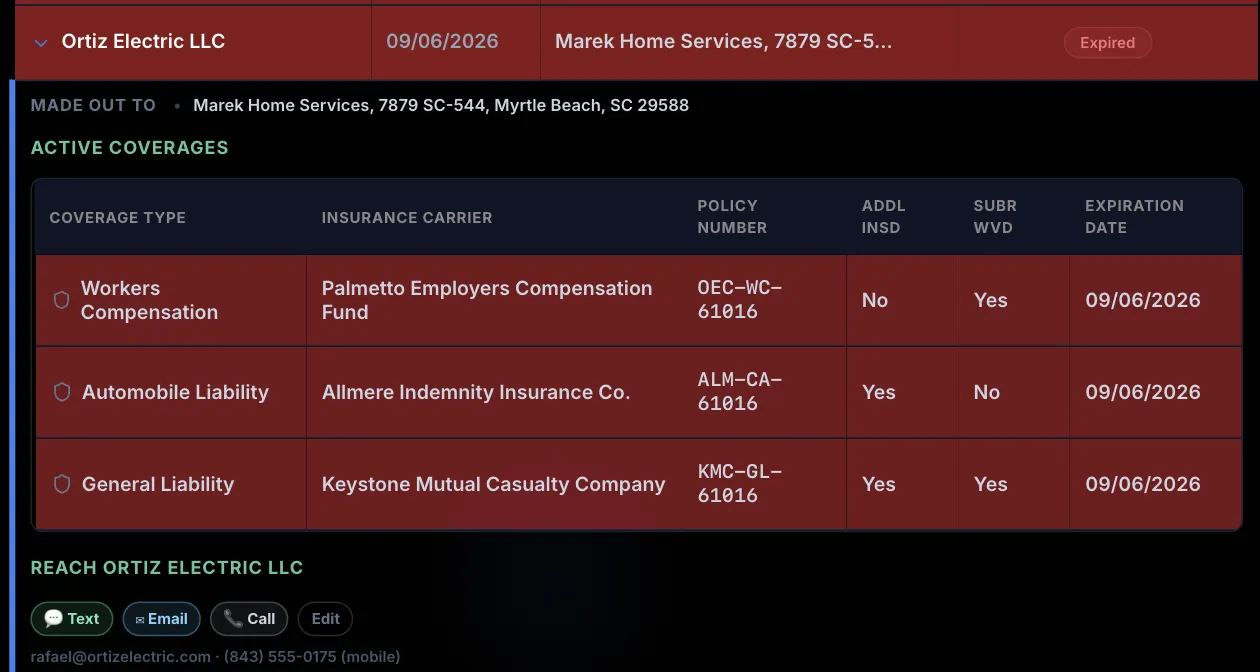
It shows up on the badge on the Compliance button, on its row in the Compliance ledger, and in the Information Center. A certificate made out to a different company is flagged too, in amber, because in force isn't the same as covering you.
Tax Docs
That's a rule you could look up. This names the subcontractor, the payment that took them over the line, and what you still need before you can file. It tells you before anything is late, which is the point: chasing an address and a tax number in January is the part that goes wrong.
Tax identification numbers are stored locked, and shown as dots.

Account Coverage
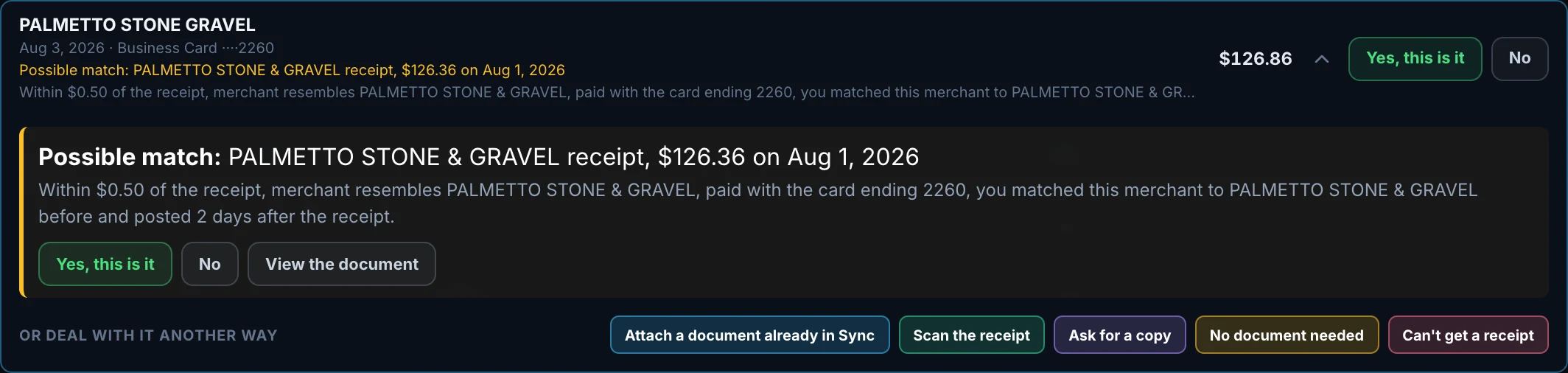
Connect a bank or card account and Global Office: Sync holds every charge up against the receipts, bills and invoices it already has. What comes back is the list your accounting software can't give you: the charges with nothing behind them.

The Export Center
Global Office: Sync isn't an accounting system and doesn't want to be. It feeds the one you already have: no migration, no retraining, and no risk to books that already exist. Every edition sends to all three.


The Audit Trail
Every field the scanner proposed and every one you corrected is kept side by side, for as long as the account exists, with the source document attached. When a client asks how a number got there, or an examiner does, you can show them the whole chain from photograph to ledger.
Every entry says which account made it as well as the IP address. "I do not know who changed that" isn't an answer you should ever have to give a client.
The trail can't be edited from anywhere in Sync, including by the person who built it.
An entry can't be altered or removed after the fact, and the database refuses it rather than the app simply not offering a way. That's the difference between a promise and a design.


Four documents you can hand to somebody
Two looks
Global Office: Sync opens in Luminous Dark. If you'd rather work on something closer to paper, Tailored Light is one click away, and switching back is just as quick. It's the same interface either way, with every button where you left it. Only the style changes.

The part nobody wants to think about
Silence is the fault that costs the most, because a record that quietly went nowhere is one you find out about from an auditor rather than from your app.
What changes between them is how much the app has to ask you. An edition with nobody working for you never mentions certificates of insurance. An edition running one business never asks which business this is.

Runs against every client's real chart of accounts, pulled from their own books. One client's records can't be reached from another's account, and the isolation is enforced in the database rather than in the interface, so it holds even if the interface has a bug. It opens on the whole practice, and asks a client for documents with a link that needs no account.

No chart of accounts anywhere, no client switching, and it never asks which business this is. Gets Quotes and Compliance, because a contractor who hires subcontractors is the person who needs certificates watched most. Built for a phone in a work truck.

Musicians, drivers, photographers, trainers, and anybody else in business on their own. The same engine as Global Office: Sync - Contractors Edition, without the questions that only matter when somebody works for you.
Here's what Global Office: Sync won't do, and why…
up front instead of buried in the terms.
There's nothing to install. It runs in the browser, adds itself to your home screen, and updates itself with no app store in the way.


