Document intake
Nothing has to be renamed and nothing has to be in a particular order. Choose the reader for what you're handing over, and Global Office: Sync takes a photograph, a PDF, a folder of many, or a thing with no document at all, and pulls every field off it.
Caught before it's sent
Your phone checks it right there and asks what you want to do: Retake photo, or Use it anyway. You find out before you've walked away from the counter, not a minute after. Retaking it takes two seconds right then. The check happens on your device before the photo is uploaded. It doesn't use AI and nothing is sent anywhere just to decide whether the picture is clear enough.
And your photograph stays on the phone until it actually lands. A bad signal isn't your fault, so the photo waits there with everything you entered, and both go up together once you have a signal.
Nothing is ever filed pointing at a picture that's not there.

So each document type has its own button and its own reader, looking for its own fields. A receipt has line items, tax and shipping. A 1099 has a payer block. A certificate of insurance has several coverages, each with its own limits and its own expiry date. One general purpose reader looking for "the total" would find the total on all of them and miss everything that matters.

Receipt. Money going out, read down to the line: every item, the tax, the shipping, the payment method, and the job it belongs to if you name one.
Income. Invoices and anything that brought money in, with the lines separated into labor and the materials you bought and passed through.
Utility. Electric, gas, water and internet bills, read for the account number, the charges and the statement period, so a bill that never arrived can be noticed by its absence.
Mileage. Trips and travel logs. When standard mileage is used, each trip is valued at the IRS rate in force on the date it was driven rather than this year's rate.
Tax Docs. W-9s and the 1099 family. Both are read for the tax identification number, which is stored locked and shown as dots, and a 1099 is also read for the payer block and the amounts.
Compliance. Certificates of insurance, read for every coverage on the page with its carrier, its policy number, its limits and its own expiry date, and for who the certificate is actually made out to. In Global Office: Sync and Global Office: Sync - Contractors Edition. Global Office: Sync - Solo Edition is one person with nobody working for them, so it has no certificates to watch.
Donation. Donation receipts and acknowledgment letters, in Global Office: Sync only. Global Office: Sync - Contractors Edition and Global Office: Sync - Solo Edition don't take donations.
Quote. Quotes you have written, read for the customer, the job, the total and the date it expires, so a quote that runs out with nothing invoiced against it is noticed. In Global Office: Sync - Contractors Edition and Global Office: Sync - Solo Edition. Global Office: Sync has no Quotes ledger.
Triage. Not a document type. The desk where anything the reader couldn't make sense of waits for a person, which is the subject of the last section here.
A mixed pile
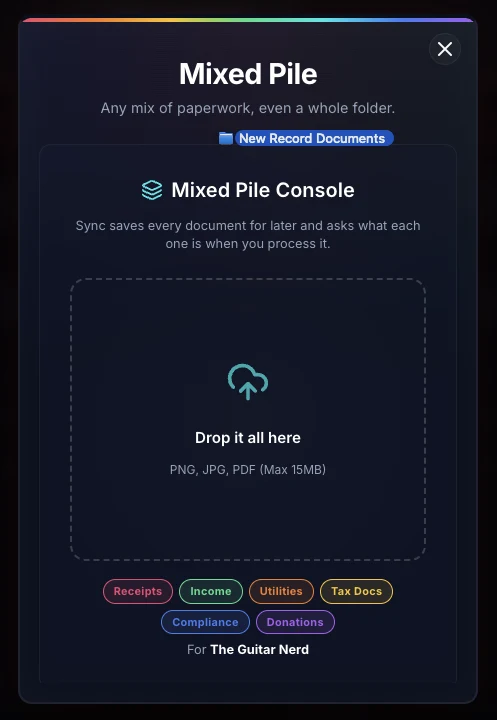
Real paperwork doesn't come sorted. On a computer, drag the whole folder into the window with no scan button open, and a Mixed Pile box opens on its own. A bookkeeper is asked whose documents they are, unless a client is already chosen.
Drop it all there. Sync keeps the pictures and PDFs, goes through folders inside folders, and tells you about anything it left out. Every document is saved to Process Later, and when the last one is in, the box disappears with a poof.
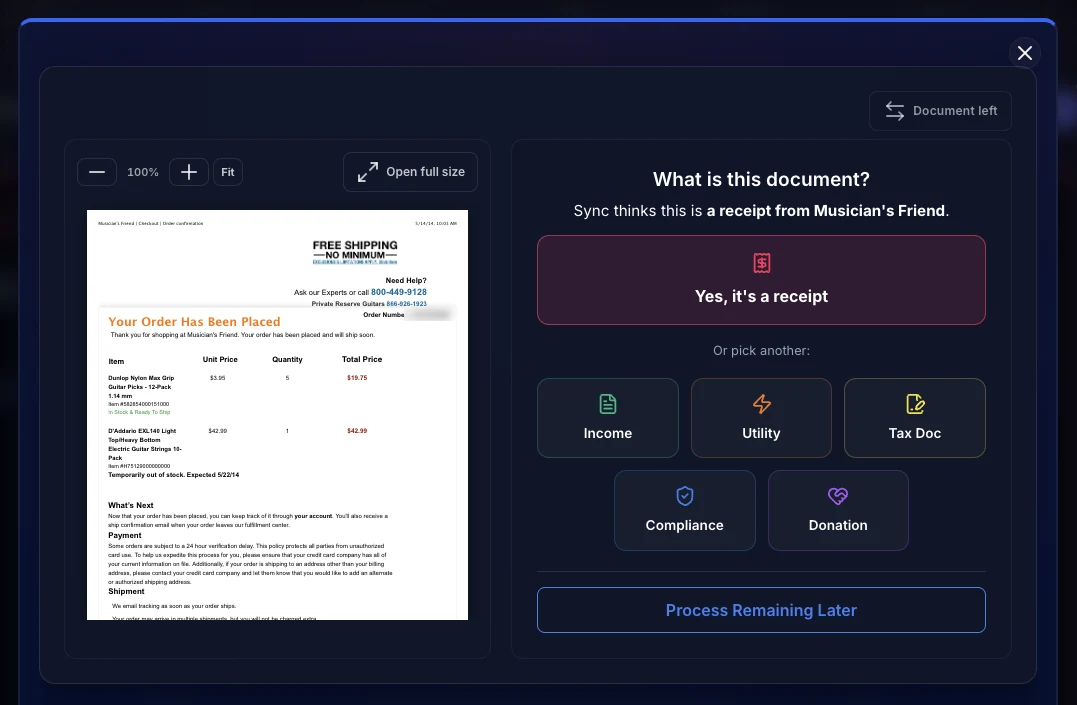
Then Sync gives each document one quick look and suggests what it is and who it's from. When you process one, the suggestion is the big button on top, and the other kinds are right below it.
An invoice somebody else made out is a bill you pay. Only an invoice the business sent counts as income. When Sync can't tell which it is, it asks.
Nothing is read in full or filed until you click the button.
The same receipt all the way through: an amplifier repair order from a local shop, $245 on the 30th of June, five handwritten lines of parts and labor, paid by check. Ten to twenty seconds on a normal connection2, and the only thing a person does is look at the review and say yes.


The review screen is one screen, with the photograph beside the numbers3, so checking a figure never means opening something else. Anything that needs a second look says why in words rather than in a color.
It's held, not dropped. The worst failure is the quiet one. A record that went nowhere without a word is one you hear about from an auditor, not from your app.