
If the business is yours · Global Office: Sync - Contractors Edition
Every competing product is fed by a bank feed, and a bank line reads HOME DEPOT $450. It has no line items and it doesn't say what was bought. Global Office: Sync reads the lines.
One · Open the business
Global Office: Sync opens on a whole practice because a bookkeeper has a roster. You have one business, so the first screen is a different screen: whose insurance and W-9s are in order, which charges have no paper behind them, and which jobs made you anything.

Three things across the top. Compliance, tax forms, and how much of your card and bank spending has a document or a written reason behind it. On the screen above: all six subcontractors covered, two who will need a 1099 on $6,090.00 paid, and 72 of 96 charges documented at 75%.
A card for each ledger. Receipts, income, utilities, mileage and quotes, each with its total and its count, and each one the same figure that ledger's own pill shows, so the dashboard can never quietly disagree with the ledger behind it.
What needs attention, and what's only worth knowing. Two lists, because one list teaches you to ignore the list. Each finding carries the control that settles it: open the coverage, open the quotes, reconnect the books.
How ready the people working for you are. Ready to work, cover expiring within thirty days, no cover at all, no W-9, and a certificate that names somebody else. Click one of those and the Compliance ledger opens filtered to exactly those people. It doesn't touch the jobs table, because they're answers to different questions.
Every job in one table. Money in, money out, what's left, the miles, and when something last happened on it. Mileage is valued at the standard rate and is deliberately not counted in what a job cost. Click a job and every ledger opens filtered to it, carrying the dates you were looking at.
And it's where the app opens. Choosing a ledger leaves it, and the Dashboard button in the middle of the bottom bar brings it back.
Two · Get the paperwork in
Not a companion app with three buttons on it. The same ledgers, the same findings, the same jobs, on the screen you actually have with you. Photograph it now and deal with it tonight.


Three · Understand the jobs
A project / job is whatever you type, and the list suggests itself from the jobs already in use. Anything that makes you build a list first would be asking you to do paperwork in order to file paperwork.
You may not know what share of your year rode on your biggest job, because working it out means adding up a year of jobs by hand. One glance at the wheel and you can see it. Eleven percent is one answer. Sixty is a very different one.
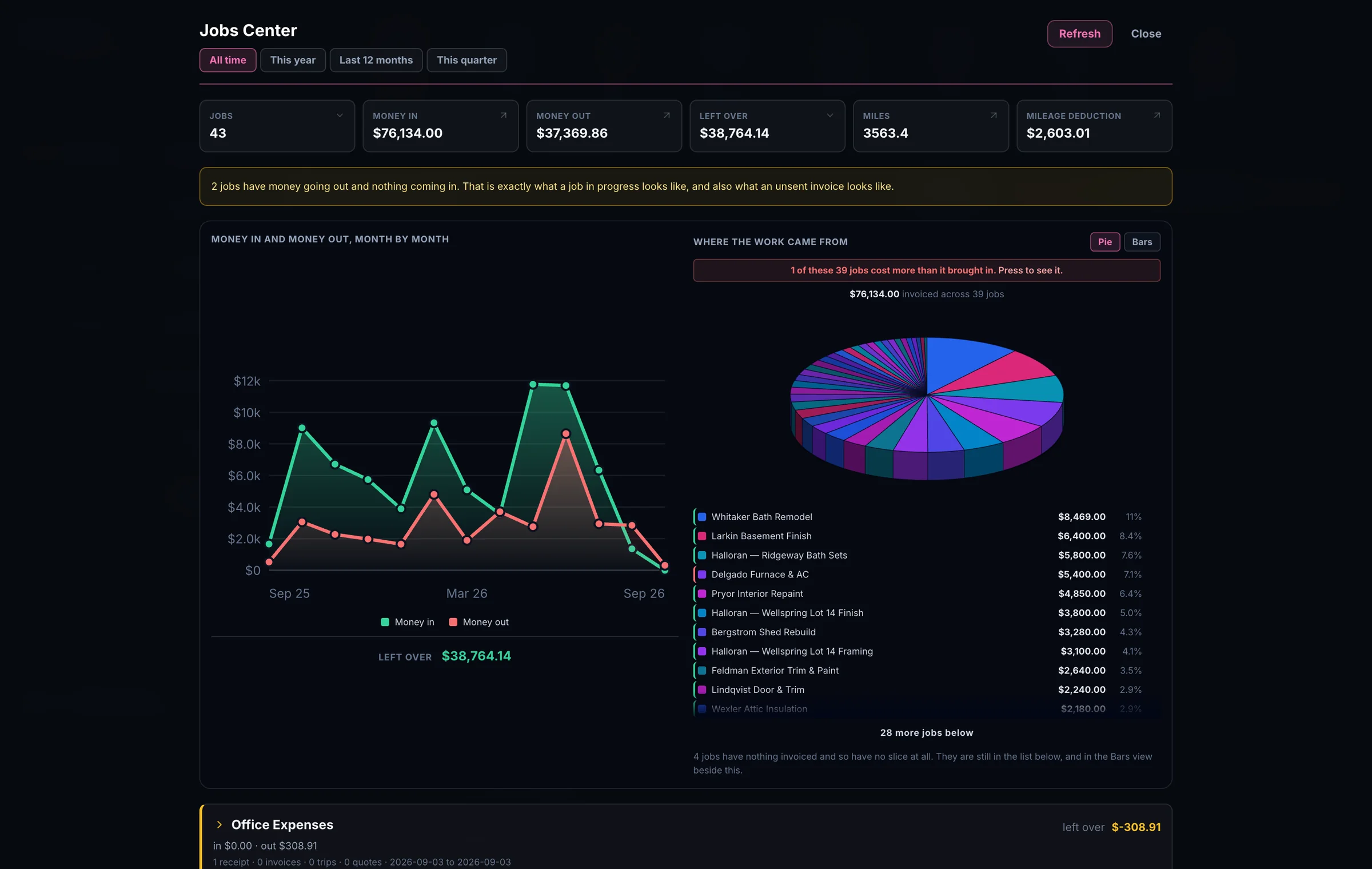
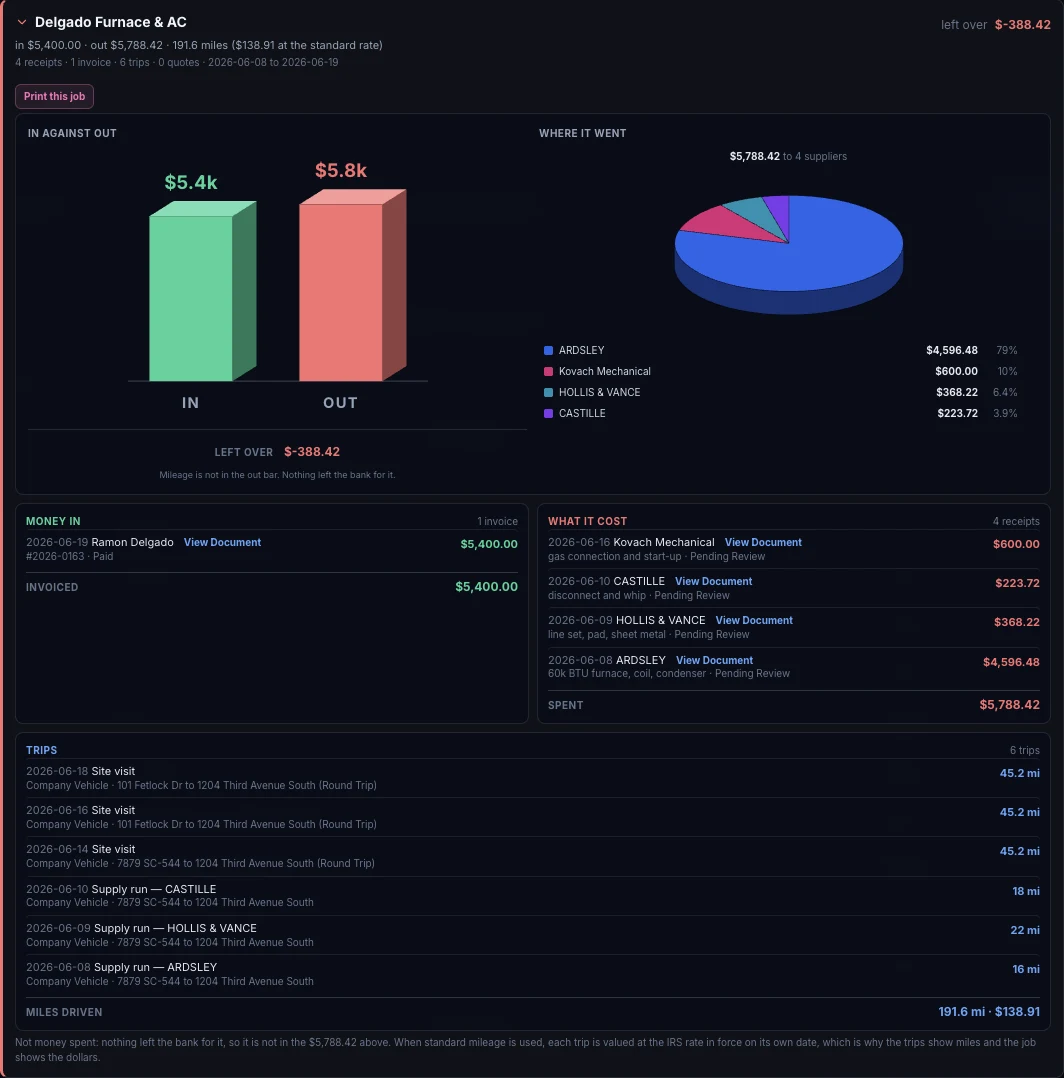
Open a job and it shows you. The Delgado job invoiced $5,400 and spent $5,788.42 on four suppliers, so it lost $388.42. Normally you'd wait to work that out until the end of the year, and by then it would be too late to adjust your pricing.
The invoice, every receipt that went into it, and all six trips are on the same screen, each one still just one click from the photograph it came off.
43 jobs - one of them cost more than it brought in. Global Office: Sync found it from paper you'd already scanned.
What you earned, and what it was for. An invoice total doesn't say how much was labor and how much was materials you bought and passed through at cost. $85,900 of labor against $14,760 of materials is the number that decides whether you're profitable or just busy.
Not just where you spent it, but WHAT you spent it on. Lumber, roofing, fasteners, subcontracted labor. Sync already read the lines on your receipts, so there's nothing to set up first. Tap a slice and the Receipts ledger opens on exactly the receipts behind it, with the matching lines lit up. One receipt can hold nine lines and only one of them roofing, so it shows you which one.
What the driving is worth. You drove 4,221.8 miles. That's $3,077.30 at the standard rate, across 255 trips and 42 jobs. When standard mileage is used, every trip is valued at the IRS rate in force on the date it was driven. Not this year's rate. That day's rate.
Which bills are overdue, and for how long. Not just the count, the dates. Five bills are past due, and the oldest has been sitting since July 20th. You see them provider by provider, with everything due in the next two weeks right beside them. Settling one records a real payment, so a bill can be part paid, paid two ways, or taken back.
What you last paid for a thing, and where. $37.39 per box, usually, and this one was $42.99, put in front of you while you're searching. That's not a record of money already spent. It's the number you need when you're pricing the next job.
Everyone you deal with, named by your own paperwork. You never built this list. It assembled itself out of the documents you scanned, with the phone numbers and emails from the documents themselves.
Four · Keep the subcontractor records ready
A contractor who hires subcontractors is the person who needs certificate expiry watched most, so Global Office: Sync tells you three separate times.
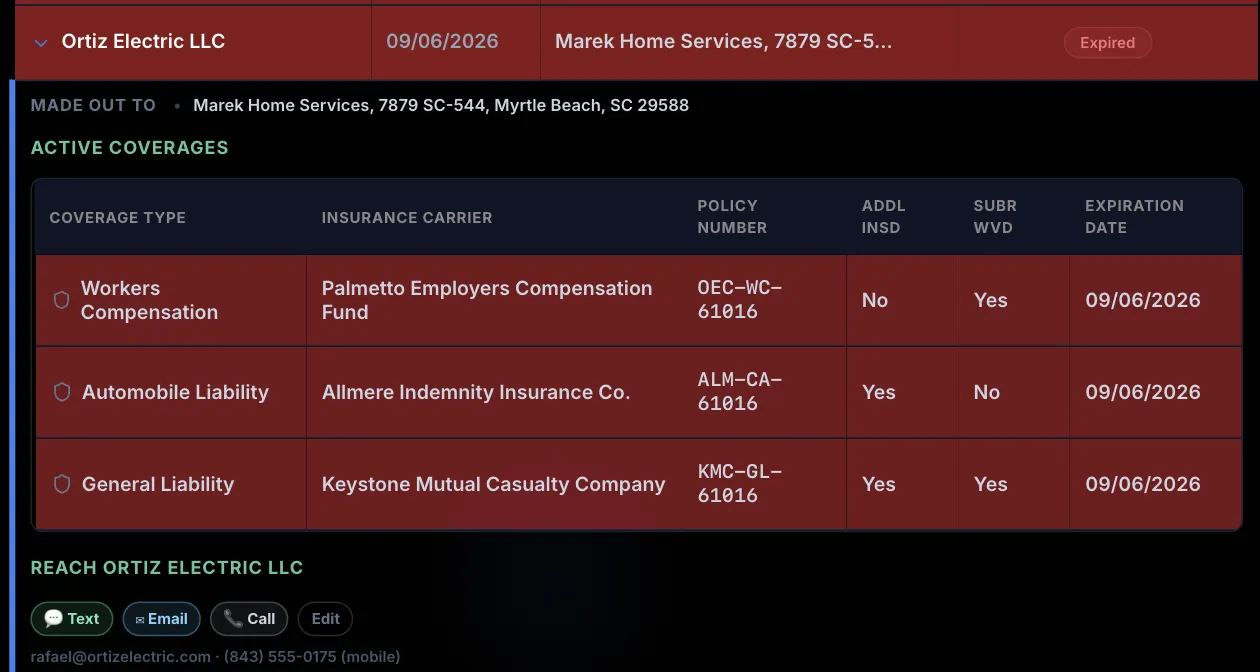
Open a certificate and every coverage on it is listed, with the carrier, the policy number and the date it ran out. A certificate made out to a different company is flagged too, in amber rather than red and labeled as such, because in force isn't the same as covering you.
If your insurer audits you, they can declare an uncovered subcontractor to be your employee and charge you a premium on every dollar you paid them after their coverage lapsed.
The argument at a workers' compensation audit is usually about who counts as your employee, and it's won with paper you either have or don't.
Tax forms
That's a rule you could look up. This names the subcontractor, the payment that took them over the line, the date it happened, and what you still need before you can file. It tells you before anything is late, which is the point: chasing an address and a tax number in January is the part that goes wrong.
Sync knows the difference between a hardware store & a person you paid to work. It collects W-9s, and reads the 1099 family that comes back. Tax identification numbers are stored locked and shown as dots.

Five · Find the missing paperwork
Connect a bank or card account and Global Office: Sync holds every charge up against the receipts, bills and invoices it already has. What comes back is the list of charges with nothing behind them, which is the first spending an examiner asks about.

Six · Connect to your bookkeeper
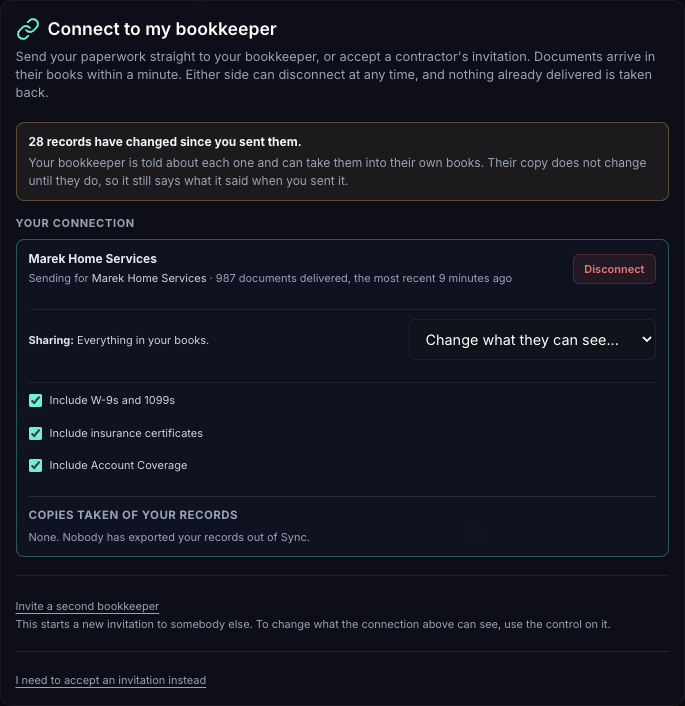
Approved records cross over as copies with the document attached. You decide how far back the bookkeeper can see and whether your Account Coverage goes too, and you can change either later. Your business details travel with the invitation, and either side can cut the link at any time.
The bookkeeper can mark a bill paid, or change how much of a cost is business, and you're told within the minute. Nothing else crosses back.
If nobody does your books, the same records go straight out to QuickBooks Online, Xero or FreshBooks instead. Nothing here needs a bookkeeper on the other end.
Seven · Hand over something supported
You're never shown an account column and never asked to build a list. Global Office: Sync does the matching silently on the way to QuickBooks Online, Xero or FreshBooks, with the photograph attached to the transaction on the accounting side rather than left behind here.
You buy it once and own it. There's nothing to install: it runs in the browser, adds itself to your home screen, and updates itself with no app store in the way.